V7RCDOM‑V2
A dedicated board that lets you control robots and vehicles through the V7RC app
Built around ESP32‑C3, it combines Wi‑Fi / BLE, motor control, charging, and power delivery. This is not a board that exists only in slides. It is built for real robot and vehicle projects.
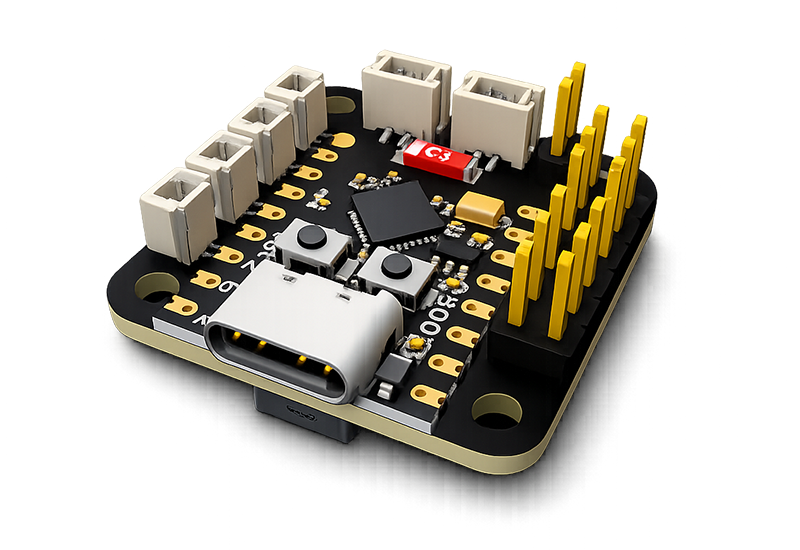
31 × 31mm
Board Size
4
DC Motor Outputs
4
GPIO / PWM Ports
6
Max Simultaneous PWM Devices
There is no such thing as too many creative ideas
V7RCDOM‑V2 is more than a dedicated development board for the V7RC ecosystem. It combines control, communication, and power design in one platform. You can also use V7RCDOM‑V2 directly for IoT development. It is not just a chip placed on a small board, but a concentration of the key capabilities needed for real robot prototyping.
Feature 01
Build many kinds of vehicles quickly
V7RCDOM‑V2 is not a generic classroom board. It is a core control board designed for practical deployment, especially for small motor control, power delivery, and mechanism integration.
Feature 02
Compact size, high integration
Within a 31mm × 31mm board, it integrates driving, communication, power management, and programming support for space-constrained robot designs.
Feature 03
Integrated with the V7RC ecosystem
It can serve as the common hardware foundation between the V7RC app, control protocols, teaching content, and real robot projects.
Feature 04
Premium feel without the premium price
Its accessible price makes it easier to turn ideas into reality.
A carefully designed circuit layout makes integration easier
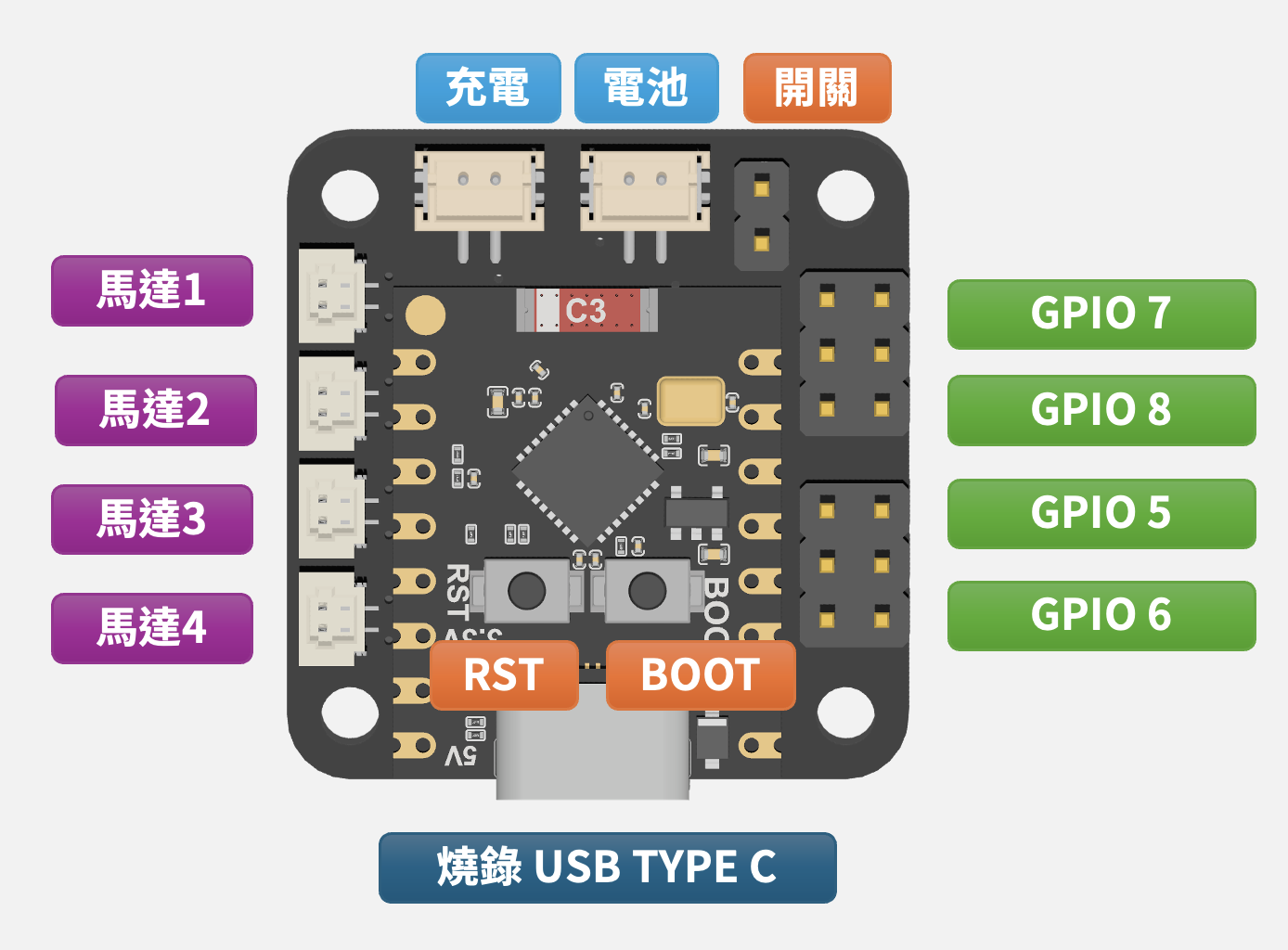
No soldering required. Just plug peripherals into the connectors and bring your project to life.
01
4 DC motor outputs matched to real vehicle control needs
It satisfies the needs of most vehicle platforms. Controlling four DC motors is straightforward and convenient.
02
Charging, battery, and power switch are integrated together
It handles more than just the battery. Charging and power switching are also built in. With a single 18650 battery, you can power the board.
03
USB Type-C flashing makes development more direct
In classrooms and rapid prototyping, the simpler the flashing process is, the easier it becomes to adopt in real projects instead of stopping at a demo.
Understand the GPIO layout before developing your firmware
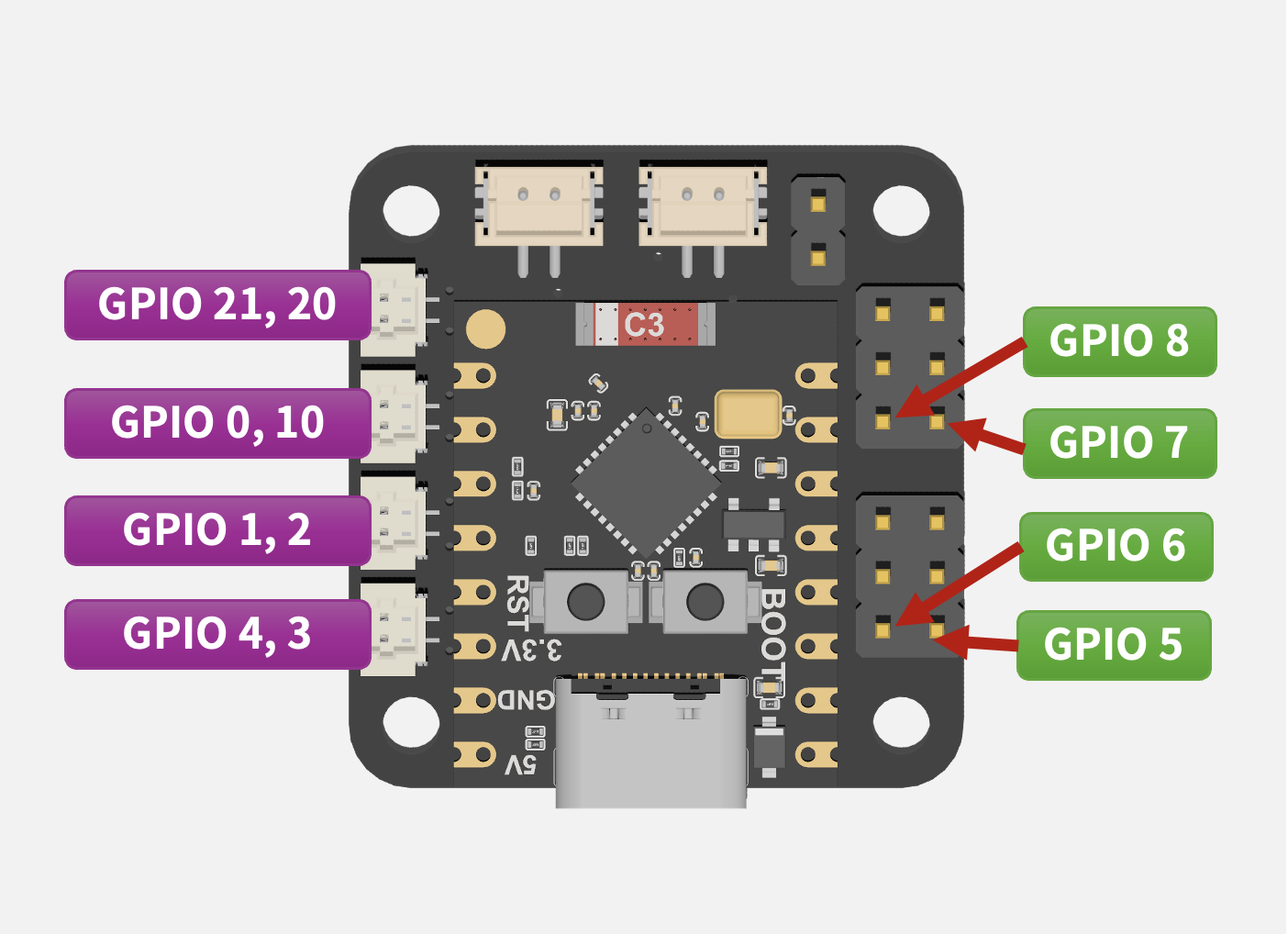
If you want to build your own application, first check which connectors each GPIO maps to.
01
Motor 1~4 map to GPIO 21/20, 0/10, 1/2, and 4/3
When the drive output logic is clearly documented, the site no longer needs vague marketing filler.
02
Four PWM / GPIO ports on the right side for servos and peripherals
This area maps directly to real devices you can connect instead of merely listing GPIO numbers.
03
GND / VCC / GPIO ordering reduces wiring mistakes
Explaining connector direction clearly is one of the most direct ways to improve product experience and reduce support cost.
Small in size, complete in capability, and more highly integrated
The purpose of the comparison section is not to exaggerate. It is to clearly show how many modules and integration steps this board can save compared with a typical separated control-board setup.
It should not only support development, but also help you deliver results quickly
For your development work or ideas, please refer to our documentation to accelerate your project.
Environment
Arduino IDE
Suitable for teaching, prototype validation, and integration with the V7RC robot control workflow.
Environment
MicroPython
Suitable for teaching, prototype validation, and integration with the V7RC robot control workflow.
Environment
ESP32 Development Tools
Suitable for teaching, prototype validation, and integration with the V7RC robot control workflow.
From educational demos to real mobile platforms
The value of this board is not just a list of specs, but the kinds of creations it can actually support. Application scenarios should be shown up front.
Spec Snapshot
We keep bringing in more ideas and resources. Thank you to all makers for your support.
Build with V7RC
Need education deployment, custom integration, or product collaboration?
This content is now driven by MDX, so brochures, articles, and images can be updated directly without changing the page layout.